PDF Reader: All File Tools
KFC BazarProductivity
4.35.00 Reviews
- Version
- 1.0.5
- Installs
- 50.00K
- Age Rating
- Everyone
Screenshots
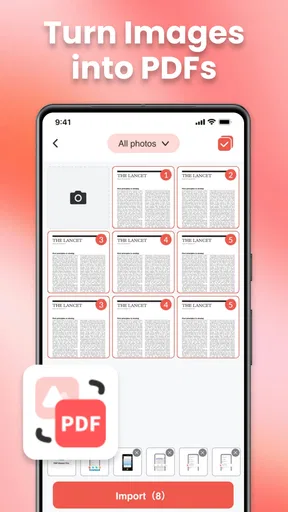
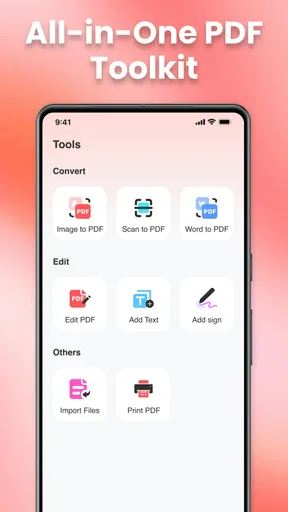
Our Review of PDF Reader: All File Tools
 Analysis by Appyee
PDF Reader: All File Tools is the kind of productivity app I reach for when I want to open a document quickly without turning the task into a larger project. My overall impression is straightforward: it is a practical PDF utility for everyday reading and file handling, but it should be judged as a focused tool rather than a complete document-work suite. That distinction matters because a simple reader can be more comfortable than an overloaded office app, while still falling short for people who need advanced editing or collaboration.
Developed by KFC Bazar, this free Android app is aimed at anyone who keeps PDFs on a phone and wants a lightweight way to access them. Its store summary describes it as a tool for managing and reading PDF files, and that focus comes through in the way I think about its usefulness: it belongs beside the basic utilities I use for opening receipts, manuals, forms, study notes, and downloaded documents. It is not trying to replace a full desktop workflow.
The app has an average rating of 4.2 from 23 ratings, with 10K+ installs, so there is already a small but visible audience using it. It is rated for Everyone, costs nothing to download, and the current release is version 1.0.4. Those details make it easy to try without a financial commitment, although the relatively modest number of ratings means I would treat the score as an early impression rather than a definitive verdict.
What using it feels like in everyday work
I find the everyday value of PDF Reader: All File Tools clearest when I treat it as a quick reading stop, not the place where every document task must be completed. That distinction helps me decide which files belong here and which should move to an editor or a broader document app. The next section looks at how that focused role compares with other ways of handling PDFs.
A focused way to get from a file to a readable page
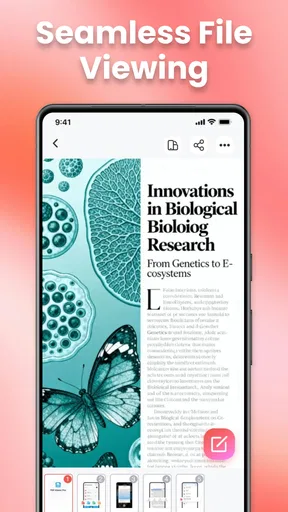
The main strength here is concentration. When I open a dedicated PDF reader, I expect the document to be the center of attention. I do not want to navigate through presentation tools, cloud storage features, note-taking systems, or a large office suite just to read a few pages. PDF Reader: All File Tools makes sense for that moment when the file is already on my device and I need a direct route to its contents.
That simplicity is especially useful on a phone. A mobile screen already limits how much information I can see at once, so a reader that keeps the task narrow can feel more manageable than an app built around many unrelated document types. I can imagine using it for a downloaded instruction manual, a travel confirmation, a school handout, or a work document that I need to consult while away from a computer.
One practical habit I would recommend is treating the app as the first stop for document triage. Instead of opening every file and immediately trying to edit it, I would use the reader to decide which documents actually need further work. Read the file, identify the relevant pages, and only then move to a more specialized editor if changes are necessary. That workflow avoids using a heavy application for a task that only requires quick reading.
Where the file-management angle matters
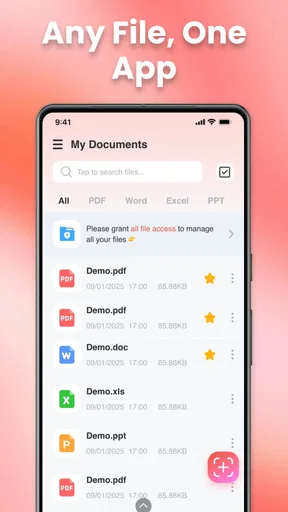
The phrase “all file tools” suggests that the app is intended to do more than display a single PDF opened from another application. For me, the useful question is not whether it can replace every document utility, but whether it helps reduce the small friction around a collection of files. A reader becomes more valuable when I can locate the document I need without repeatedly browsing through unrelated folders or relying on a separate app just to begin.
This is the sort of tool that can fit a simple personal filing routine. I might keep downloaded bills in one folder, reference documents in another, and temporary PDFs in a third. The app can then serve as the reading layer across those groups. That approach is more reliable than expecting the reader itself to become a complete archive, especially when the documents have different purposes and should be organized at the device level.
A less obvious benefit of a lightweight reader is that it encourages better storage habits. If I use one app for every document without any organization, finding older files becomes frustrating regardless of the reader. I would rename important PDFs clearly, remove duplicates after checking them, and keep only the versions I still need. The app can make access easier, but it cannot replace a sensible filing system.
A realistic morning-to-evening scenario
Imagine receiving a PDF schedule in the morning, a product guide during lunch, and a form in the evening. I would use this app first to read each document and decide what action follows. The schedule may only need a quick look. The guide may require returning to a particular section later. The form may need to be completed elsewhere if it contains fields or signatures. That separation between reading and editing is one of the clearest ways to use the app well.
On a phone, I would also avoid opening a long document while rushing between tasks. Instead, I would download it, open it when I have a stable moment, and note the page or section I need. This sounds basic, but it prevents the common problem of repeatedly searching through the same file. A PDF reader is most helpful when it supports a deliberate reading routine rather than becoming another place where documents accumulate unnoticed.
What it does well for casual and regular readers
For casual use, the combination of a free price, an Everyone content rating, and support for Android 8.0 or later gives the app a broad starting point. It is suitable for people who want a dedicated PDF option without paying for a subscription before knowing whether they will use it regularly. I also see value for users with older compatible phones who prefer not to install a large, multi-purpose office package.
The strongest case is not dramatic. It is the repeated small task: open, read, check, and move on. A focused reader earns its place by making that sequence predictable. If the app stays responsive on the device and presents files clearly, that is enough to make it useful for many people. I would rather have a modest tool that fits this routine than a crowded interface full of functions I never touch.
There is also a privacy-minded practical advantage to keeping reading local when possible, although I would not assume anything about storage or permissions beyond what the app itself displays during use. My recommendation is simple: pay attention to the Android prompts, and do not grant access casually. A PDF reader may need access to files you choose to open, but the user should still understand what is being requested before accepting.
The important limitation: reading is not the same as document production
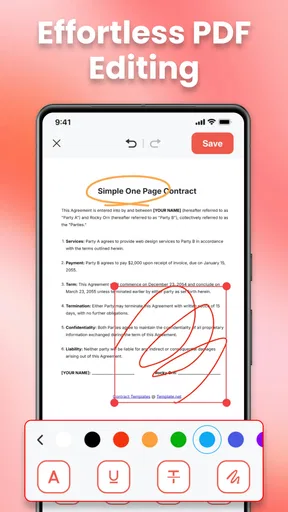
The biggest weakness is the gap between the broad wording of “all file tools” and what many people may expect from a modern document app. A reader can be excellent at opening and viewing PDFs while still being the wrong choice for editing text, rearranging pages, signing forms, converting files, adding detailed annotations, or sharing a document through a team workflow. I would not choose this app as my only tool for those jobs without first checking that the exact function I need is available.
This matters because PDFs are often used as finished documents, but not always. A student may want to highlight passages. A freelancer may need to add a signature. A manager may need to merge several reports. A family member may want to fill in a form. Those are different tasks, and they require different levels of support. If my goal is simply to read, a focused reader is appropriate. If my goal is to change the document, I would compare it with a dedicated editor before relying on it.
Another trade-off is that a lightweight app may not offer the same ecosystem as a major office or cloud-storage platform. Someone who works across a phone, tablet, and computer may value synchronized files, shared folders, version history, or integrated scanning more than a clean reading experience. In that situation, the usual alternative may be better even if it feels heavier, because the surrounding workflow is more important than the reader itself.
I would also be cautious about judging the app by a single successful opening. PDFs can vary widely: some are mostly text, some contain complex layouts, and others are scans made from images. A file that looks simple may behave differently from a document with unusual fonts or embedded elements. My practical advice is to test the kinds of PDFs you actually use before moving your entire reading routine to the app. That is a more useful trial than opening one basic document and assuming every file will behave the same way.
How it compares with familiar alternatives
The usual alternatives fall into two groups. The first is a large office or cloud-storage app that happens to read PDFs. Those options are often better when I need one place for documents, editing, sharing, and synchronization. Their weakness is the extra complexity: the PDF may be buried inside a broader system, and the app may feel excessive for a quick read.
The second group consists of specialized PDF readers with mature annotation, search, form, and synchronization features. These are stronger choices for professional or academic workflows where a document is not merely something to view. Their downside can be a more complicated interface or paid access to important tools. PDF Reader: All File Tools is more appealing when I want a free, direct reader and do not need the full feature set of a document-management platform.
My decision rule would be simple. Choose this app if your main question is, “Can I open and read my PDF files easily on Android?” Choose a more advanced alternative if your question is, “Can I revise, sign, organize, synchronize, and collaborate on these documents?” That distinction prevents disappointment and gives the app credit for what it is trying to do.
Who should install it, and who should skip it?
I would recommend it to Android users who regularly download PDFs and want a dedicated productivity utility rather than a full office environment. It should suit people reading manuals, schedules, school material, personal records, and reference documents. It is also a reasonable low-risk trial for someone who wants a free option and uses a phone running Android 8.0 or newer.
It is less suitable for a professional who depends on advanced PDF operations every day. If I needed reliable form completion, detailed markup, document conversion, page assembly, or a connected team workflow, I would look elsewhere first. The same applies to users who want one application to manage many office formats, because a PDF-focused tool may not cover that broader need.
For students, the answer depends on study style. If I mainly read course PDFs, the app could be a convenient companion. If I need extensive highlighting, handwritten notes, citation management, or synchronized study materials, I would compare it with a note-taking or academic reading app. For families, it may be useful for opening school notices and official forms, but I would not assume that opening a form means being able to complete it.
Small habits that make the experience better
I would begin by opening several documents that represent my actual routine, not just one test file. Include a short text-heavy PDF, a longer document, and a scanned file if those are common in your day. This quickly shows whether the app fits your needs and helps you identify which documents should remain in a more advanced tool.
Next, I would keep the device folders tidy and use clear filenames. A reader can only help me find a file that is stored sensibly. For recurring documents, I would create a simple naming pattern with the subject and date, then remove obsolete copies after checking them. This turns the app from a basic opener into part of a dependable personal workflow.
Finally, I would separate “read now” from “process later.” If a document needs a signature or a change, I would mark that mentally or in my task list rather than assuming the reader is the right place to finish the job. This is a small but important trade-off: the app is most satisfying when I use it for fast access and reading, not when I force it to become an editor it may not be designed to replace.
My verdict after weighing the trade-offs
PDF Reader: All File Tools has a clear reason to exist: it offers a free, approachable way to handle everyday PDF reading on Android. Its early 4.2 average and 10K+ installs indicate that it has attracted initial interest, while the Everyone rating makes it easy to consider for general household use. I see it as a sensible utility for people who value direct access over a long list of advanced features.
My recommendation comes with a boundary. Use it as a focused PDF reader, not as a promise of a complete document office. That expectation makes the experience much fairer. It can be the app I open when I need to check a file quickly, sort through routine documents, or read something away from my computer. It should not automatically become my choice for editing, signing, collaboration, or complex document production.
The developer, KFC Bazar, has positioned this release in a useful everyday category, and version 1.0.4 gives interested users a current build to try. Since the app is free, my practical advice is to install it, test it with the PDFs I genuinely use, and keep it if its straightforward approach matches my habits. For quick reading and basic file handling, it is worth a trial; for serious PDF work, I would pair it with a more specialized alternative.
Verdict
Strengths of PDF Reader: All File Tools
- Opens PDFs quickly, even when switching between several documents.
- Supports common office formats alongside PDF files.
- Built-in search makes finding words and phrases straightforward.
- Useful file organization tools help locate recently opened documents.
- Sharing documents from the app is simple and convenient.
Limitations of PDF Reader: All File Tools
- Some advanced tools may require a premium subscription.
- Large files can take longer to load on older phones.
- The interface may feel crowded for first-time users.
- Ads can interrupt the experience in the free version.
- Editing features may be limited compared with dedicated PDF editors.
Similar Picks in This Category
View All
Google Calendar
Google LLC4.6

Google Drive
Google LLC4.3

Google Assistant
Google LLC3.9

Microsoft OneDrive
Microsoft Corporation4.6

Samsung Calendar
Samsung Electronics Co., Ltd.4.1

Microsoft OneNote: Save Notes
Microsoft Corporation4.6
Frequently Asked Questions
What is PDF Reader: All File Tools used for?
PDF Reader: All File Tools is designed to help you open, read, and manage PDF documents from a mobile device. During testing, it was useful for viewing files stored locally, navigating through pages, and accessing documents without needing a desktop computer. Depending on the version, it may also include tools for organizing, sharing, converting, or handling other common file formats.
Can PDF Reader: All File Tools open files other than PDFs?
Despite its main focus on PDF documents, the app is presented as an all-in-one file utility, so it may support additional document or office formats. Compatibility can vary according to the app version and the file type being opened. Users should check the supported-format list in the store description before downloading, especially if they need to work with Word, spreadsheet, image, or text files.
Does PDF Reader: All File Tools work offline?
The basic reading experience generally works with PDF files already saved on your phone, meaning an internet connection is not normally required to open and browse local documents. However, features such as online file access, cloud integration, advertisements, document conversion, or downloading files may require connectivity. It is best to test important documents offline before relying on the app while traveling.
Is PDF Reader: All File Tools free to download and use?
The application can typically be downloaded without an upfront charge, but free access may include advertising, optional purchases, or restrictions on advanced tools. Some functions could be limited until users upgrade, depending on the current release and regional availability. Before installing, review the Google Play or App Store listing carefully to understand subscriptions, in-app purchases, and any trial conditions.
Is PDF Reader: All File Tools safe for private documents?
The app may be suitable for viewing ordinary PDFs, but users should still be cautious when opening confidential contracts, identification documents, financial records, or work files. Review the permissions requested during installation and read the developer’s privacy policy to understand how files and usage data are handled. Avoid granting unnecessary access, and do not upload sensitive documents to online tools unless you trust the service.
